Please login or click here to join.
Forgot Password? Click Here to reset pasword
 |  |  |  |  |  |
cathyml Posts: 23275 Joined: 25th Jan 2010 Location: South Africa | quotePosted at 19:29 on 24th July 2010 England has so many lovely castles I thought it would be fun to showcase your favourite picture of a castle. Please make sure that you have added a comment to the picture if you are going to post it as a favourite!! SCOTNEY CASTLE, Lamberhurst, Kent 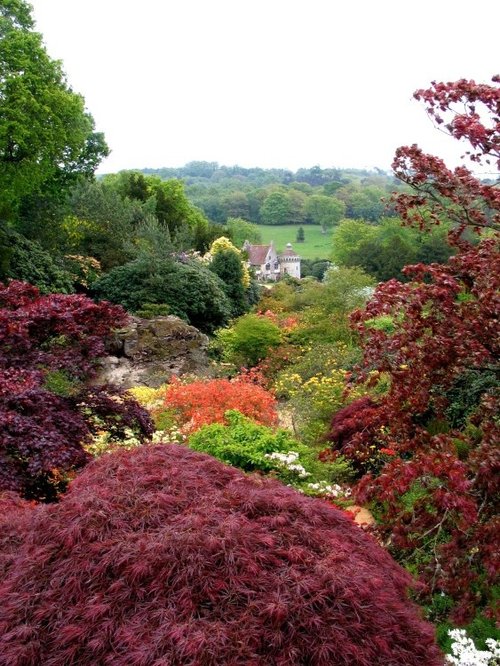 Picture by Mac McFarlane CHOLMONDELEY CASTLE, Malpas Cheshire 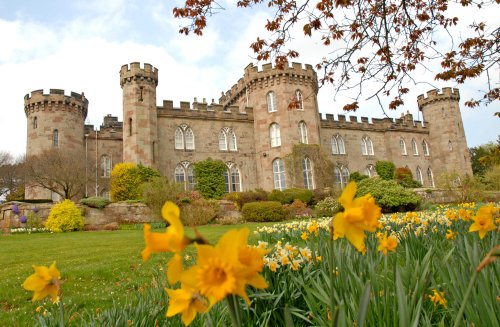 Picture by Andy Easthope |
James Prescott Posts: 25952 Joined: 11th Jan 2010 Location: UK | quotePosted at 20:28 on 24th July 2010 |
| cathyml Posts: 23275 Joined: 25th Jan 2010 Location: South Africa | quotePosted at 21:15 on 24th July 2010 |
| cathyml Posts: 23275 Joined: 25th Jan 2010 Location: South Africa | quotePosted at 21:37 on 24th July 2010 Not sure how to find pictures of your favourite castle?? Go down to the bottom of the page, enter the castle name in the green "google search" box and click google search. A list of pictures of the castle will appear, but one should say Pictures of ....... Castle. Click on that title and it will take you to a page which offers you "A picture tour of ...... Castle", click on that line. It will then open the pictures, here I would suggest clicking on thumbnails so that you can see all the pictures available. Make your selection, note the picture ID number, click on the picture and make a comment, if you haven't already. Return to this thread and insert the ID number as usual in the Insert box (which you get when you click the green tree icon, third from right in the tool bar below). Sounds complicated, but just take it step by step and you will be surprised how easy it is. Looking forward to seeing stunning photos of fabulous English castles. Alternatively: If you have added a castle picture to your favourites, then you can quickly get the picture ID from there and insert it in the thread. Edited by: cathyml at:24th July 2010 22:05 |
Vince Hawthorn Posts: 12758 Joined: 19th Apr 2010 Location: UK | quotePosted at 23:02 on 24th July 2010 Arundel Castle. I will have to nominate Arundel Castle and my picture of the Keep although I am somewhat biased. My wife and daughter can trace their ancestral line back to and beyond William d'Aubigny and his wife Adeliza of Louvin( she was the widow of King Henry 1). The picture shows the Keep and this was built by William around 1138 on top of the post conquest motte.  Picture by Vince Hawthorn
|
| cathyml Posts: 23275 Joined: 25th Jan 2010 Location: South Africa | quotePosted at 10:29 on 25th July 2010 |
Shaun Wilson Posts: 1832 Joined: 23rd Dec 2009 Location: UK | quotePosted at 11:17 on 25th July 2010 |
| cathyml Posts: 23275 Joined: 25th Jan 2010 Location: South Africa | quotePosted at 20:23 on 25th July 2010 It is isn't it Shaun, it has been one of my favourites since I came on the site, but I was too shy to comment then, lol. (Not anymore!). I forgot to mention that there is of course a Picture tour of Castles on POE which you can look through to find a favourite photo to put in this thread!! |
Ron Brind Posts: 19041 Joined: 26th Oct 2003 Location: England | quotePosted at 20:34 on 25th July 2010 Who can see the pumpkin though? |
| cathyml Posts: 23275 Joined: 25th Jan 2010 Location: South Africa | quotePosted at 20:38 on 25th July 2010 Supposed to look at the castle Ron not get carried away with the vegetation, lol. |
Follow PicturesOfEngland.com on social media and help share the beauty of England....